![imagotipo_negativo (1)-1.png]](https://help.adsmurai.com/hs-fs/hubfs/imagotipo_negativo%20(1)-1.png?width=40&height=40&name=imagotipo_negativo%20(1)-1.png)
To setup Quora Ads we'll need 3 data points from your Quora Ads dashboard: your Account Id, your Pixel ID and the access token for Conversion API.
How do I get my Account ID and access token in the Quora Business Manager?
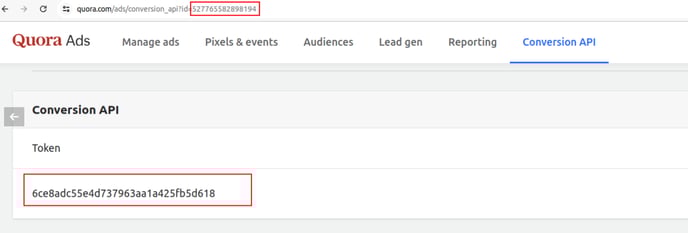
- Go to the "Conversion API" section in your Quora Ads dashboard..
- Click on "Generate token"
- Copy the token.
- Click on "Generate access token".
- Copy and save this token.
- The "Account ID" can be found in the url of the page.
- Save it for later.
How do I get my Pixel ID in the Quora Business Manager?
- To find the Pixel ID go to "Pixels & events" and click on "Setup pixel".
- Pick "Install with a partner".
- You'll find the Pixel ID. Copy it
How do I add a new pixel in Adsmurai One Tag and generate my API key?
- Access your user area in Adsmurai One Tag.
- Click on the "+" symbol to add a new pixel.
- As the Pixel ID, add: Account ID | Pixel ID. Example: If your Account ID is 123456 and your Pixel ID is 78980fef424, your Pixel ID for Adsmurai One Tag would be "123456|78980fef424".
- Paste the access token obtained from Quora Ads.
- Save.
How do I integrate the API key in Google Tag Manager?
- Go to your Google Tag Manager container.
- Open the One Tag tag.
- Add the Pixel ID to the "Quora Ads pixel ID" field. It should be the same combination of "Account ID|Pixel ID" as the previous step.
- Save the changes made.
Done!