![imagotipo_negativo (1)-1.png]](https://help.adsmurai.com/hs-fs/hubfs/imagotipo_negativo%20(1)-1.png?width=40&height=40&name=imagotipo_negativo%20(1)-1.png)
Today we’re talking about mapping in Data Import.
This is where we make sure your catalog includes all the required fields based on your industry—so we don’t run into headaches when launching campaigns on Meta, Google, or TikTok.
Because yes… you already know this is one of the biggest pains.
And there’s something key you need to understand from the start: we don’t define the rules—platforms do. If you want to play it safe, here are the fields your catalog must have (this isn’t a suggestion, it’s the rule):
But what does this mean in practice?
It means that when you upload a catalog, simply "having the information" isn't enough. It must be organized exactly how the platforms expect to read it.
Because when we upload a new catalog, what we are actually doing is translating the information into the specific fields required by Meta, Google, or TikTok.
This configuration isn't just another technical detail: it’s what prevents errors, rejections, and campaigns that never get off the ground.
In short: you are translating your catalog into the platforms' language.
And that’s where things get interesting. Because this happens all the time:
-
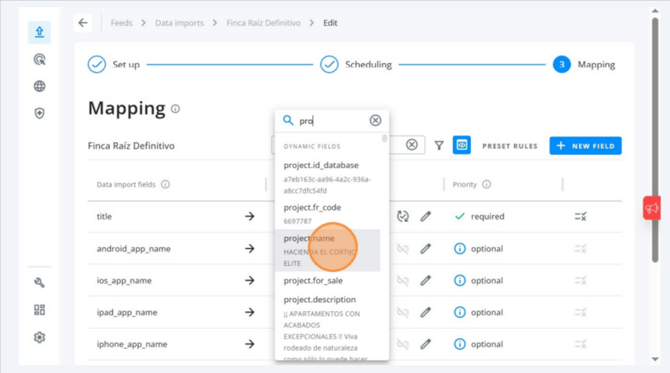
Your catalog says project.name, but the platform expects title → you have to make a match.
.png?width=670&height=369&name=How-to-Configure-Product-Mapping-for-Data-Imports-03-27-2026_10_29_AM%20(1).png)
-
You have project.url,but the platform expects link → it must be mapped correctly.
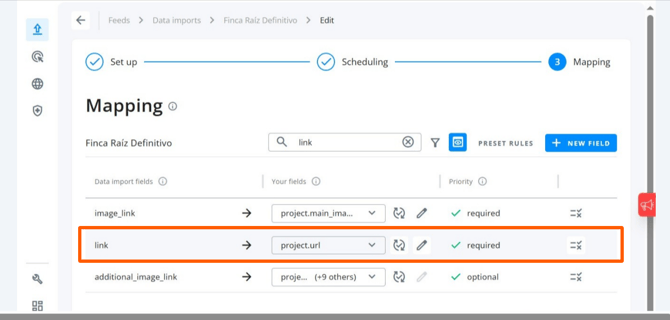
It sounds simple... but this is where everything breaks down.
Because while it’s easy in theory, in execution, it’s what determines whether your campaign runs... or never even gets off the ground.
How to perform the mapping (step-by-step)
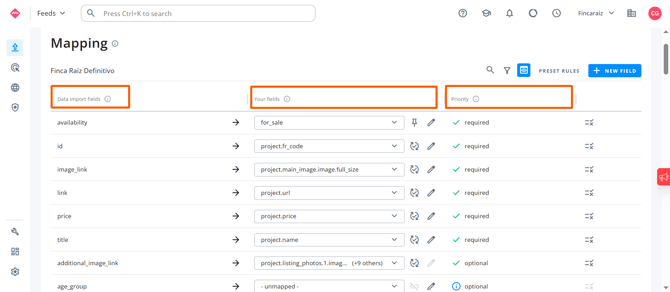
On the left column, you have the field name as it must be called for your catalog to work on platforms like Facebook, Google, etc.
In the middle column, you will see the name exactly as it currently exists in your catalog.
And in the third column, we indicate whether that field is mandatory or not—making your life easier so you don't have to memorize it all.
So far, so good. Easy. But this is where it gets interesting...
What happens if you have custom fields that don't exist in any official catalog regulations, but are crucial for your business?
If that’s the case for you, here is what you need to do: Click on the pencil icon.
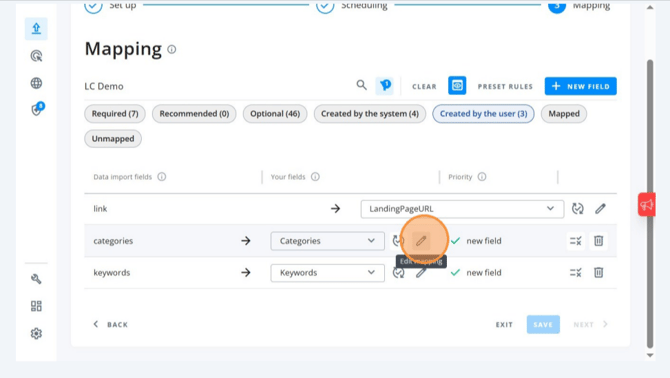
Select the second option: “Match it with Undetected Field.”
.png?width=670&height=383&name=Mapping-Categories-to-an-Undetected-Field-in-Adsmurai-03-27-2026_10_44_AM%20(1).png)
Write the field name exactly as it appears in your catalog. And that’s it.
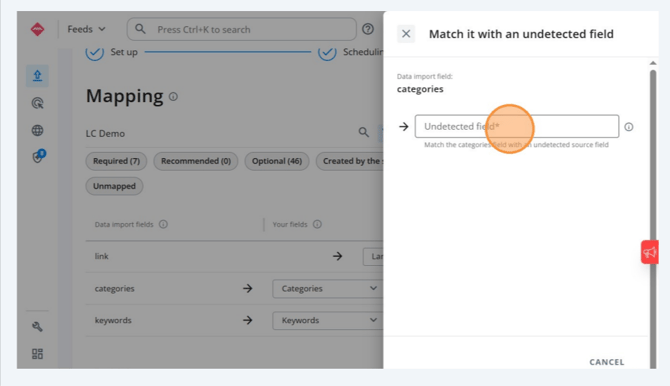
And what happens if your catalog is missing a mandatory field?
Don’t worry, there’s an easy fix: Click on the pencil icon.
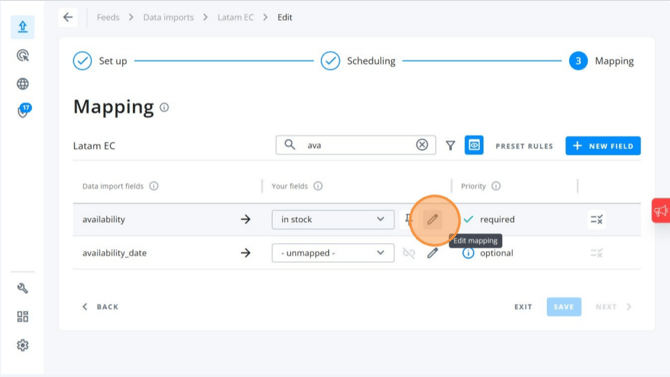
Select the first option: “Match it with a Static Value.”
.png?width=670&height=364&name=Configuring-Static-Availability-Values-in-Adsmurai-Feeds-Manager-03-27-2026_10_52_AM%20(1).png)
Type in the value you want to assign (for example, in stock).
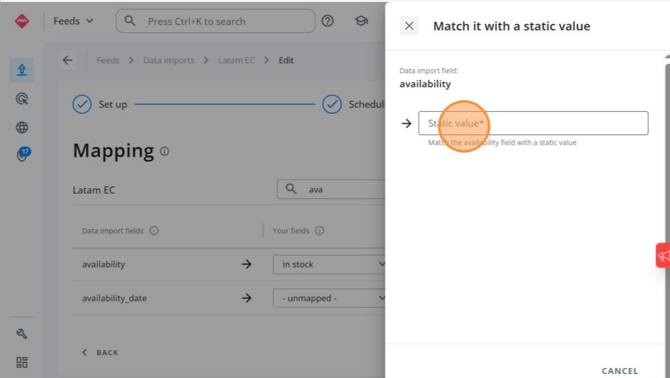
✅ This works perfectly when the field doesn't change from product to product. This way, your catalog stays compliant with the platform's rules—no errors, no headaches.
⚠️ Golden Rule
You must complete, at a minimum, all fields marked as "Required." This is not optional.
This is what allows your Data Import to save correctly and lets you launch campaigns without errors.
Transformations: The real power 🔥
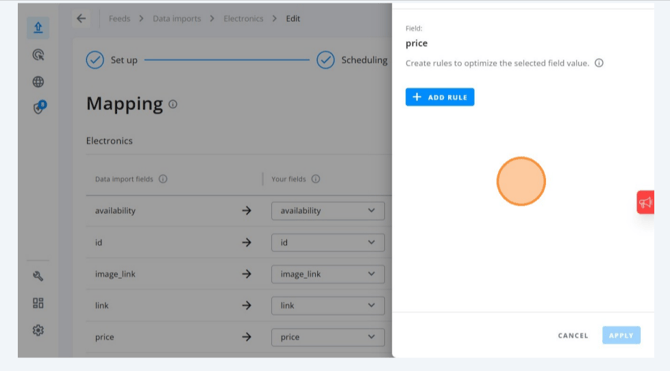
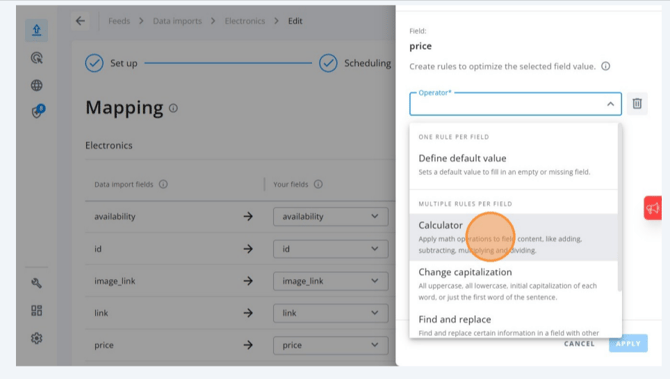
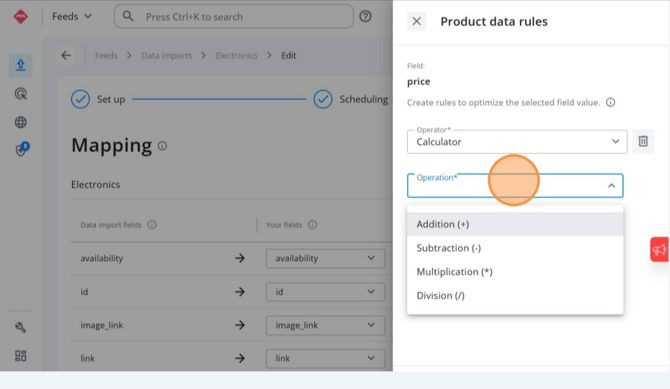
I’m sure you noticed the icons on the right 👀. That’s not decoration. That is where you can transform your data.
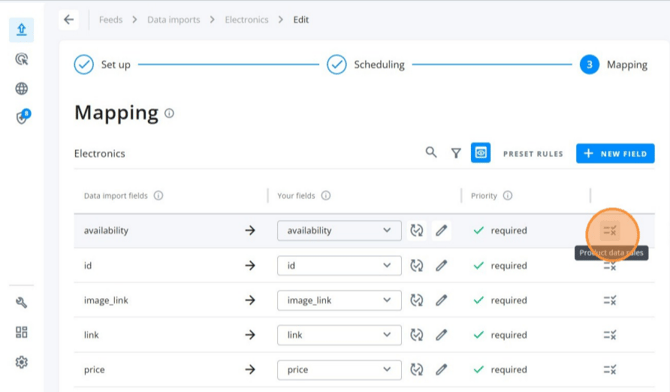 Real-life examples:
-
Special price (e.g., credit card discount)? → Apply formulas
.png?width=670&height=374&name=How-To-Configure-Data-Import-Rules-In-Adsmurai-Feeds-03-27-2026_11_06_AM%20(1).png)
- Titles in ALL CAPS (and Meta isn't a fan)?
→ Normalize the format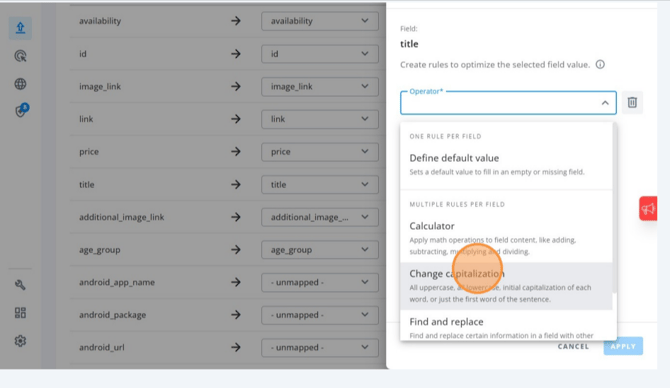
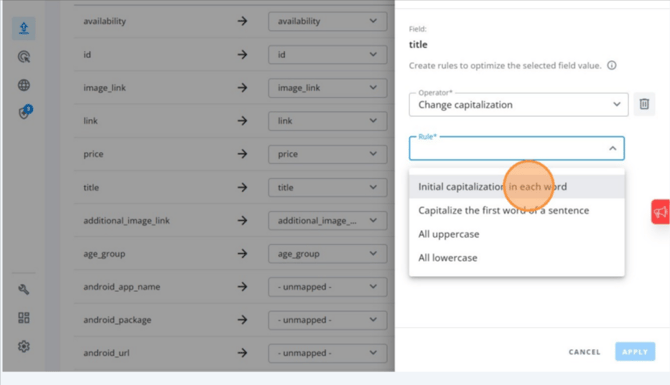
- Price with a comma instead of a decimal point?
→ Perform a replace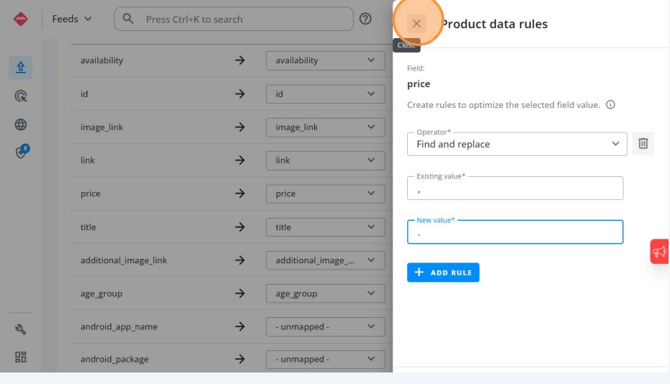
- An eternal title that looks like a testament 😂?
→ Trim characters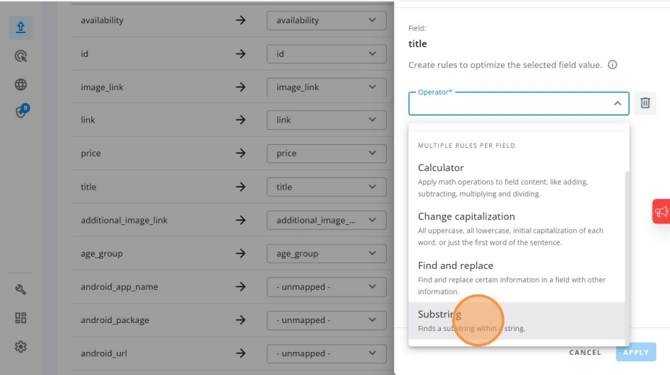
.png?width=670&height=374&name=How-To-Configure-Data-Import-Rules-In-Adsmurai-Feeds-03-27-2026_11_11_AM%20(1).png)
.png?width=670&height=372&name=How-To-Configure-Data-Import-Rules-In-Adsmurai-Feeds-03-27-2026_11_11_AM%20(2).png)
⚠️ Watch out for this (seriously)
If you don't have a clear pattern in your data, these transformations can turn into chaos. And that's where the trouble starts:
-
Incomplete titles
-
Misinterpreted prices
-
Campaign errors
-
Wasted budget
In other words...
In most cases, the problem isn't your ad strategy... It’s that your catalog hasn't been properly translated into the platform's language. Mapping is literally that translator. If this fails, everything else fails too.